Stepping into the world of smart home technology can feel like a leap into the future, but it doesn’t have to be complicated or expensive. The Wyze Smart Plug stands out as an incredibly accessible and powerful gateway, transforming your everyday “dumb” appliances into intelligent, remotely controllable devices. Imagine turning off your bedside lamp from your phone after you’re already cozy in bed, or scheduling your coffee maker to start brewing just before your alarm rings. This little device makes smart living not just a possibility, but an effortless reality for everyone.
What Exactly is a Wyze Smart Plug and Why Should You Care?
At its heart, a Wyze Smart Plug is a compact device that plugs into your standard wall outlet, allowing you to plug any non-smart appliance into it. Once connected, this unassuming gadget grants you remote control over that appliance via the Wyze app on your smartphone, or even with voice commands through popular smart assistants. It’s essentially an on/off switch with a brain, extending your control beyond the physical button on the device itself.
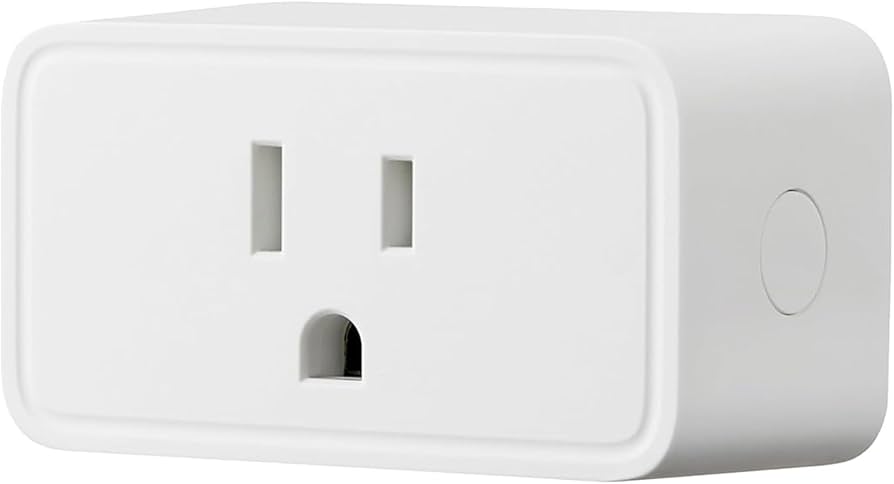
Why should you care? Because it offers unparalleled convenience and opens the door to a more automated lifestyle without breaking the bank. Whether you want to control a lamp, a fan, a humidifier, or even holiday lights, the Wyze Smart Plug provides an instant upgrade, making your home more responsive to your needs and schedule.
The Core of Home Automation: Understanding Smart Plugs
Smart plugs are the unsung heroes of many smart homes, serving as the foundational building blocks for automation. Their primary function is straightforward: to provide remote power control to any device that plugs into a standard electrical socket. This simple capability unlocks a world of possibilities, from basic remote switching to sophisticated scheduling and automation routines. They bridge the gap between your existing appliances and the ever-growing ecosystem of smart home devices.
The Wyze Smart Plug exemplifies these core benefits, making smart home functionality accessible to a broad audience. Its compact design often allows two plugs to fit comfortably in a single standard duplex outlet, a thoughtful feature that maximizes utility without hogging valuable wall space. This design, coupled with its affordable price point, makes it easy to outfit multiple areas of your home, turning various “dumb” devices smart with minimal investment.
How Does a Wyze Smart Plug Work and What You Need to Get Started
The magic behind the Wyze Smart Plug lies in its Wi-Fi connectivity. It connects directly to your home’s wireless network, allowing the Wyze app on your smartphone to send commands to it from anywhere you have an internet connection. When you tap “on” or “off” in the app, or issue a voice command, that signal travels through your Wi-Fi, instructing the plug to switch the power to the connected appliance.
To get started with a Wyze Smart Plug, you’ll need just a few essentials:
- A 2.4GHz Wi-Fi Network: Wyze Smart Plugs, like many smart home devices, operate exclusively on the 2.4GHz band of your Wi-Fi network. This band offers greater range and better penetration through walls compared to the 5GHz band, making it ideal for devices that don’t require high bandwidth.
- The Wyze App: This free app, available for iOS and Android devices, is your central command center for all Wyze products, including the Wyze Smart Plug.
- A Standard Power Outlet: Any regular wall outlet will do.
- An Appliance to Control: From lamps and fans to humidifiers and chargers, anything you can plug in can become smart.
“The beauty of the Wyze Smart Plug is its simplicity,” says tech analyst Alex Chen. “It takes away the intimidation factor of smart home tech, offering powerful control with minimal fuss. Anyone with a Wi-Fi connection can get started.”
Your Easy Guide to Setting Up Your Wyze Smart Plug
Setting up your Wyze Smart Plug is designed to be a straightforward process, often taking just a few minutes thanks to the intuitive Wyze app. Here’s a general step-by-step guide:
- Plug It In: Insert your Wyze Smart Plug into an available electrical outlet. Look for a flashing blue status light on the plug, which indicates it’s in pairing mode and ready to connect.
- Open the Wyze App: Launch the Wyze app on your smartphone.
- Add a New Device: Tap the “+” icon in the top right corner of the home screen, then select “Add Device.”
- Choose “Wyze Plug”: Navigate to the “Power & Lighting” category and select “Wyze Plug.”
- Follow In-App Instructions: The app will guide you through the rest of the process.
- Bluetooth for Newer Models: If you have a 2021 or later model Wyze Smart Plug, ensure Bluetooth is enabled on your phone. The app will often use Bluetooth to quickly discover and set up the plug automatically.
- Connect to Wi-Fi: You’ll be prompted to select your 2.4GHz home Wi-Fi network from a list and enter its password. For Android users, be sure to stay connected to the plug’s temporary Wi-Fi network when prompted, even if it says there’s no internet connection, to avoid interrupting the setup.
- Name Your Plug: Once connected, the status light will stop flashing, and the app will ask you to give your Wyze Smart Plug a descriptive name (e.g., “Living Room Lamp,” “Coffee Maker”). This name will be used for app control and voice commands.
- Finish Setup: Tap “Finish.” The app might offer options to create device groups or share control with others immediately, or you can skip these for later.
You’re all set! Your Wyze Smart Plug is now ready to transform your chosen appliance into a smart device, giving you instant control from your phone.
Maximizing Your Wyze Smart Plug: Tips, Tricks, and Smart Features
The Wyze Smart Plug goes beyond simple on/off control, offering a suite of features to enhance your smart home experience:
- Custom Scheduling: One of the most popular features is the ability to create schedules. Want your porch light to turn on at sunset and off at sunrise? Or your fan to run for an hour before you get home from work? With custom scheduling, you can set precise times for your appliances to power on or off, aligning perfectly with your daily routine.
- Vacation Mode: For added peace of mind when you’re away, activate “Vacation Mode.” This clever feature randomly turns your lights on and off throughout the day, mimicking human presence and making it appear as if someone is home, deterring potential intruders.
- Device Grouping: If you have multiple Wyze Smart Plugs in a single room or for related devices (like a set of decorative lights), you can group them together in the Wyze app. This allows you to control all grouped plugs simultaneously with a single tap or voice command, simplifying your routines.
- Voice Control Integration: The Wyze Smart Plug seamlessly integrates with Amazon Alexa and Google Assistant. After linking your Wyze account in the respective assistant’s app, you can use simple voice commands like, “Alexa, turn on the bedroom lamp,” or “Hey Google, turn off the fan,” for hands-free convenience.
- Wyze Rules for Advanced Automation: For the truly ambitious, Wyze’s “Rules” feature unlocks powerful automation. You can create intricate scenarios where your Wyze Smart Plug reacts to other Wyze devices. For instance, a rule could be set to turn on a lamp plugged into a Wyze Smart Plug when a Wyze motion sensor detects movement in a room, or when a Wyze contact sensor indicates a door has opened. This interlocking ecosystem allows for dynamic and responsive home automation.
- “Run Time” Tracking: While the Wyze Smart Plug (as of early 2025) generally lacks full energy monitoring capabilities to show real-time power consumption in watts, it does offer a “Run Time” section in the app. This feature tracks how many minutes and hours a plug has been used daily and weekly, providing a basic overview of device usage.
Unlocking the Benefits: Energy Savings, Enhanced Safety, and Ultimate Convenience
The benefits of integrating Wyze Smart Plugs into your home extend far beyond just remote control:
- Energy Savings: The ability to precisely schedule appliances and turn them off remotely means you can eliminate “phantom load” – the power devices consume even when turned off but still plugged in. Forgetting to unplug your phone charger or leaving a light on becomes a non-issue; you can power them down from anywhere, potentially leading to noticeable reductions in your electricity bill.
- Enhanced Safety: Smart plugs can play a crucial role in home safety. By using “Vacation Mode,” you can make your home appear occupied while you’re away, deterring intruders. You can also quickly turn off forgotten appliances like curling irons or space heaters with a tap on your phone, preventing potential hazards. Furthermore, the 15A support in Wyze Smart Plugs means they can handle higher-power devices like TVs, providing safe and reliable control.
- Ultimate Convenience: This is perhaps the most immediate and appreciated benefit. Imagine walking into a dark house and saying, “Alexa, turn on the entryway lights,” or having your fan automatically turn on when the temperature rises above a certain point (with the right integrations). The Wyze Smart Plug streamlines daily routines, offers control from anywhere, and makes your home more responsive and comfortable.
Advanced Integrations and What to Expect from the Wyze Ecosystem
The Wyze Smart Plug is a powerful standalone device, but its true potential shines when integrated into the broader Wyze ecosystem. Wyze is known for its range of affordable smart home products, including security cameras, smart bulbs, and sensors. The Wyze app acts as a unified hub, allowing these devices to work together through “Rules” you create. For example, a Wyze Cam detecting motion could trigger a Wyze Smart Plug to turn on a floodlight.
It’s important to note, however, that while Wyze Smart Plugs offer excellent integration within the Wyze ecosystem and with Alexa and Google Assistant, they currently lack native support for Apple HomeKit and the newer Matter standard (as of early 2025). This means if you’re heavily invested in an Apple HomeKit setup, direct integration might require workarounds like IFTTT, which some users might find less seamless. Despite this, for those primarily using Alexa, Google Assistant, or the Wyze ecosystem, the integration is robust and reliable.
Frequently Asked Questions About the Wyze Smart Plug
Is the Wyze Smart Plug easy to set up?
Yes, absolutely! The setup process for the Wyze Smart Plug is designed to be very user-friendly, guided step-by-step by the Wyze app. Many newer models also utilize Bluetooth for faster pairing, making the initial connection even smoother.
Does the Wyze Smart Plug work with Amazon Alexa and Google Assistant?
Yes, the Wyze Smart Plug offers seamless integration with both Amazon Alexa and Google Assistant. After linking your Wyze account in their respective apps, you can control your plugged-in devices using simple voice commands.
Does the Wyze Smart Plug monitor energy usage?
While the Wyze Smart Plug does not provide advanced energy monitoring features like real-time wattage consumption (as of early 2025), it does offer a “Run Time” feature in the Wyze app. This tracks how long the plug has been active, giving you a basic overview of device usage.
Can I use two Wyze Smart Plugs in a single wall outlet?
Yes, one of the key design advantages of the Wyze Smart Plug is its compact size. It’s specifically engineered so that two plugs can fit side-by-side in a standard duplex wall outlet without blocking each other, maximizing your available power points.
What kind of Wi-Fi network does the Wyze Smart Plug require?
The Wyze Smart Plug connects to your home’s 2.4GHz Wi-Fi network. It is crucial to ensure your phone is connected to this band during setup and that your home router supports 2.4GHz, as the plugs are not compatible with 5GHz networks.
Conclusion
The Wyze Smart Plug offers an enticing blend of affordability, user-friendliness, and robust features, making it an excellent choice for anyone looking to dip their toes into smart home automation or expand an existing Wyze ecosystem. From effortlessly scheduling your lights and leveraging “Vacation Mode” for security to integrating with your favorite voice assistants, this compact device delivers significant convenience and control. While it may not offer every high-end feature like native energy monitoring or HomeKit compatibility, its core functionality, ease of use, and integration within the Wyze family make it an unbeatable value. If you’re ready to transform your “dumb” appliances into smart, responsive devices, the Wyze Smart Plug is a smart choice to start.