Welcome to the future of home connectivity! In our increasingly gadget-filled lives, managing power and charging devices can feel like a constant battle against clutter and inefficiency. But what if you could streamline your charging, automate your electronics, and gain intelligent control over your power outlets all at once? Enter the Smart Usb Plug, a pivotal innovation in smart home technology designed to do just that. It’s not just about turning things on and off; it’s about seamlessly integrating your charging needs with the intelligent control of your smart home ecosystem.
What Exactly is a Smart USB Plug and Why Does It Matter?
At its core, a smart USB plug is a modern evolution of the traditional smart plug, featuring integrated USB charging ports alongside standard AC outlets. Instead of juggling bulky power adapters and multiple chargers, a single smart USB plug offers direct power access for devices like smartphones, tablets, smartwatches, and more, significantly reducing cable clutter. They can come as simple plug-in adapters that fit into existing outlets or as in-wall receptacles that replace standard wall outlets for a more integrated look.
These devices are crucial for today’s connected homes because they combine convenience with advanced functionality. Imagine controlling both your bedside lamp and charging your phone through the same smart device, all managed from an app or with a simple voice command. They bridge the gap between traditional appliance control and modern device charging, making your home smarter and more efficient.
How Smart USB Plugs Work: A Seamless Connection
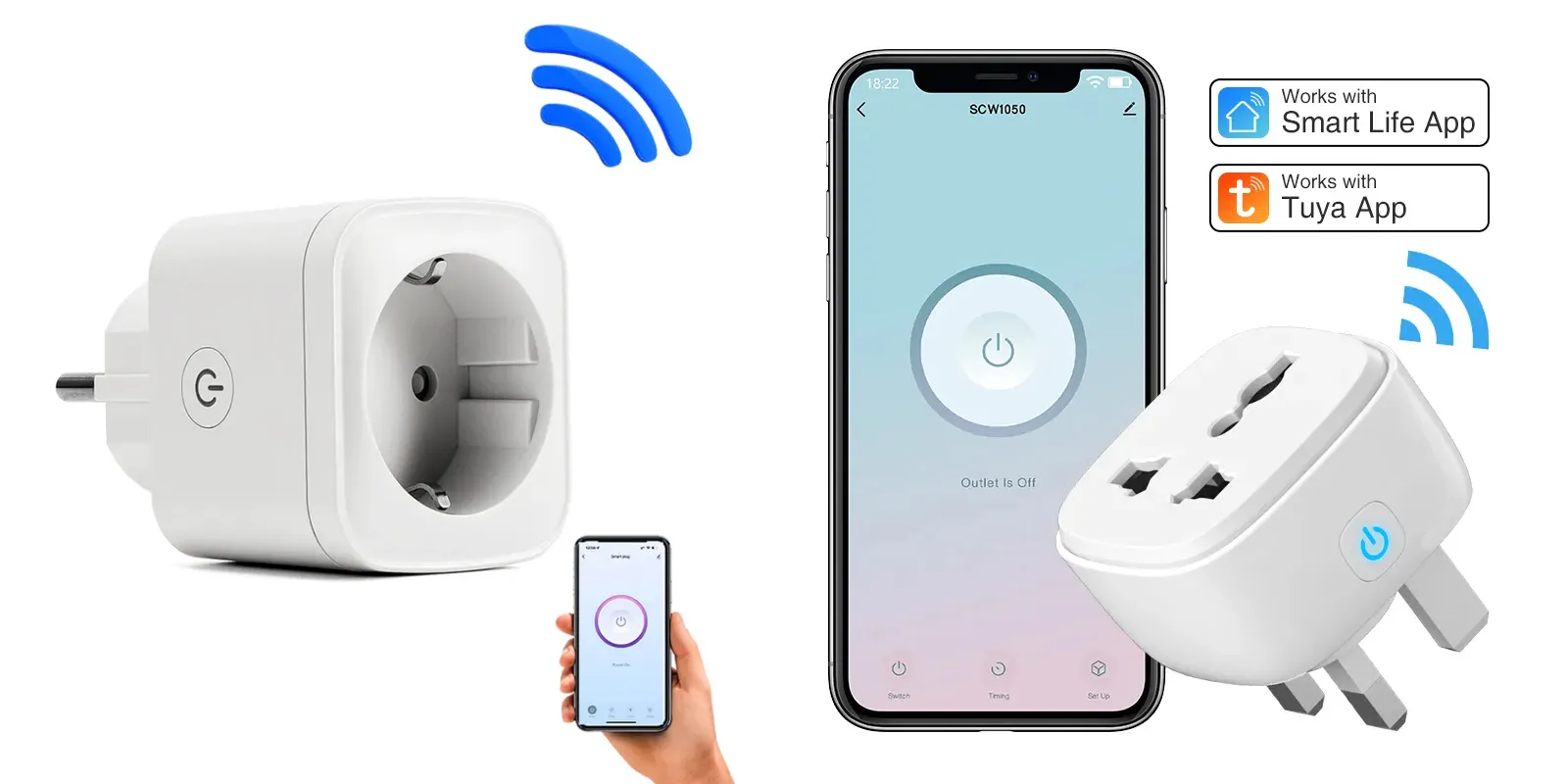
Smart USB plugs bring intelligent control to your devices through a combination of hardware and software. The magic primarily happens through Wi-Fi connectivity and dedicated smartphone applications.
When you plug in a smart USB plug, it connects to your home’s 2.4 GHz Wi-Fi network. Once connected, a companion app (like Smart Life or a brand-specific app) on your smartphone or tablet becomes your command center. This app allows for remote control, enabling you to switch devices on or off from anywhere with an internet connection. Most smart USB plugs also seamlessly integrate with popular voice assistants such as Amazon Alexa and Google Assistant, allowing for hands-free control. “Alexa, turn off the charging port,” or “Hey Google, turn on the living room fan” becomes your new normal.
A standout feature is the ability for many models to offer independent control over their AC outlets and USB ports. This means you can power down a traditional lamp plugged into the AC outlet while simultaneously keeping your phone charging via the USB port. Beyond simple on/off, smart USB plugs are equipped with advanced smart charging capabilities. Built-in chips intelligently detect the optimal charging power required by your connected device, preventing overcharging and potentially extending battery lifespan. This optimized delivery can result in up to 40% faster charging speeds compared to older, less intelligent charging methods, ensuring your devices are always ready when you need them.
Getting Started: Installation and Setup of Your Smart USB Plug
Integrating a smart USB plug into your home is typically a straightforward process, whether you opt for a simple plug-in adapter or a more permanent in-wall solution.
For Plug-in Smart USB Plugs:
- Plug In: Simply insert the smart USB plug into an existing standard wall outlet.
- Download the App: Download the manufacturer’s recommended app (e.g., Smart Life, TuyaSmart, Lumary App) onto your smartphone or tablet.
- Pair with Wi-Fi: Open the app and follow the on-screen instructions to add a new device. You’ll typically need to select the device type (smart plug/socket) and ensure your phone is connected to your home’s 2.4 GHz Wi-Fi network. The plug’s indicator light will usually flash rapidly when it’s in pairing mode.
- Connect to Voice Assistant: Once paired with the app, link the app to your Amazon Alexa or Google Home account through their respective apps. You can then discover devices, and your smart USB plug will appear, ready for voice commands.
For In-Wall Smart USB Outlets:
This option requires basic electrical knowledge. If you’re unsure, it’s best to consult a professional electrician.
- Safety First: Always turn off the power to the relevant circuit at your breaker box before starting any electrical work.
- Remove Old Outlet: Carefully unscrew and remove your existing wall outlet.
- Wire New Outlet: Connect the wires (hot, neutral, ground) from your wall box to the corresponding terminals on the smart USB outlet.
- Secure and Test: Mount the new outlet, restore power, and then proceed with the app download and pairing steps as described for plug-in versions.
“The key to a smooth setup lies in ensuring a stable 2.4 GHz Wi-Fi connection,” advises Dr. Elara Vance, a leading expert in smart home technology and energy efficiency. “Many issues arise from trying to connect smart devices to a 5 GHz network, which most older smart plugs don’t support.”
Maximizing Utility: Tips and Tricks for Your Smart USB Plug
Once your smart USB plug is up and running, a world of intelligent possibilities opens up. Here’s how to make the most of its features:
- Smart Scheduling: Automate daily routines. Set your coffee maker to brew just as your alarm goes off, or have your bedside lamp turn on at sunset and off at bedtime. This not only adds convenience but also conservates energy.
- Countdown Timers: Prevent overcharging. If you’re worried about your phone or tablet being plugged in all night, set a timer to cut power to the USB port after a few hours, protecting your device’s battery health.
- Create Smart Scenes and Routines: Integrate with your broader smart home. Combine your smart USB plug with other devices for scenarios like a “Good Morning” routine that turns on lights and starts charging your tablet, or a “Movie Night” scene that dims lights and powers on your entertainment system.
- Energy Monitoring: Keep an eye on consumption. Many smart USB plugs offer energy monitoring features within their app, allowing you to track how much electricity connected devices are using. Use this data to identify energy hogs and adjust your habits for lower electricity bills.
- Remote Access for Peace of Mind: Control from anywhere. Forgot to turn off a fan or a device before leaving home? No problem. A quick tap on your smartphone app lets you manage your smart USB plugs no matter where you are, adding an extra layer of security and convenience.
Beyond Convenience: The Multifaceted Benefits of Smart USB Plugs
Smart USB plugs offer more than just simple control; they deliver a range of practical benefits that enhance modern living.
Energy Efficiency
One of the most compelling advantages is improved energy efficiency. By allowing you to remotely turn off devices or set schedules, smart USB plugs help eliminate “vampire drain” – the power consumed by electronics even when they’re in standby mode. Energy monitoring features further empower you to understand and manage your electricity usage, potentially leading to noticeable savings on your utility bills.
Enhanced Safety
Safety is a paramount concern in any smart home setup, and smart USB plugs address this with several protective features. Many come equipped with surge protection, shielding your valuable electronics from unexpected power spikes caused by lightning or grid fluctuations. Additionally, the smart charging capabilities mentioned earlier prevent devices from overcharging, which can degrade battery life and pose a fire risk. Some designs also feature improved heat dissipation grooves to reduce the possibility of electrical crises.
Streamlined Charging and Clutter Reduction
Say goodbye to hunting for the right power adapter or dealing with a tangled mess of cables. With built-in USB ports, smart USB plugs offer direct access to power for multiple devices simultaneously, freeing up your traditional AC outlets and decluttering your space. This integration makes charging more convenient and organized.
Future-Proofing Your Charging
With the evolution of USB standards, many smart USB plugs now include both USB-A and the newer, faster USB-C ports. This versatility ensures compatibility with a wide range of current and future devices, making your charging setup more adaptable and “future-proof” for years to come.
Advanced Features and Smart Home Ecosystem Integration
Smart USB plugs are not just standalone gadgets; they are integral components of a cohesive smart home. Their ability to integrate seamlessly with various ecosystems elevates their utility.
A key advanced feature is the independent control of each individual port. This means that if you have a smart USB plug with two AC outlets and two USB ports, you might be able to control each of those four connections separately via the app or voice commands. This granular control is incredibly useful for managing multiple devices in one location, such as a bedside table or an office desk.
They are broadly compatible with major smart home platforms like Amazon Alexa, Google Assistant, and some newer models are even supporting Matter, the universal smart home standard designed for broader interoperability. This ensures that your smart USB plug can communicate effectively with other smart devices in your home, creating automated routines and scenes. For example, you could have a smart USB plug powering a fan and charging your phone near your bed, all controllable through your existing smart speaker.
Considering a smart USB power strip can further expand your connectivity options, offering multiple AC outlets and several USB ports, often with individual control and surge protection, making them ideal for entertainment centers or workstations.
Frequently Asked Questions About Smart USB Plugs
Q: Do smart USB plugs require a hub?
A: Many modern Wi-Fi-enabled smart USB plugs do not require a separate hub and can connect directly to your home’s 2.4 GHz Wi-Fi network. However, some advanced systems using protocols like Zigbee or Z-Wave might still benefit from a compatible smart home hub for broader integration.
Q: Can I control the USB ports independently from the AC outlets?
A: Yes, a significant advantage of many smart USB plugs is their ability to control the integrated USB ports separately from the standard AC outlets. This allows for greater flexibility in managing your connected devices.
Q: Are smart USB plugs safe to use?
A: Absolutely. Reputable smart USB plugs come with essential safety features such as surge protection, overcharge protection, and sometimes overheat protection. Always look for products that are UL-listed or certified by other recognized safety standards.
Q: How do smart USB plugs optimize charging speed?
A: Smart USB plugs often contain built-in intelligent chips that detect the type of device connected and deliver the optimal charging current. This “smart charging” ensures your devices charge efficiently and quickly without damaging their batteries.
Q: What Wi-Fi frequency do smart USB plugs typically use?
A: Most smart USB plugs operate on the 2.4 GHz Wi-Fi frequency. Ensure your home network has a 2.4 GHz band available for successful pairing and operation.
Conclusion
Smart USB plugs represent a simple yet powerful upgrade for any modern home. By merging the convenience of remote control and automation with efficient, clutter-free charging, they empower you to manage your devices more intelligently. From saving energy and enhancing safety to decluttering your living spaces and seamlessly integrating with your smart home ecosystem, the benefits are clear. As a strategic advisor and visionary for maypd.com, I firmly believe that embracing and innovating in the smart USB plug sector is crucial for defining the future of smart living. Consider upgrading to smart USB plugs today and experience a new level of convenience and control in your connected world.