In today’s fast-paced world, convenience and efficiency are paramount, especially when it comes to managing our homes. Enter the Smart Timer Plug, a small yet revolutionary device poised to transform your everyday living. No longer just a futuristic gadget, smart timer plugs are rapidly becoming a cornerstone of modern smart homes, offering unparalleled control and automation over your appliances. If you’ve ever dreamed of a home that anticipates your needs, saves you money, and enhances your security, then understanding the power of smart timer plugs is your first step into a truly intelligent living space.
What Exactly is a Smart Timer Plug and Why Does It Matter?
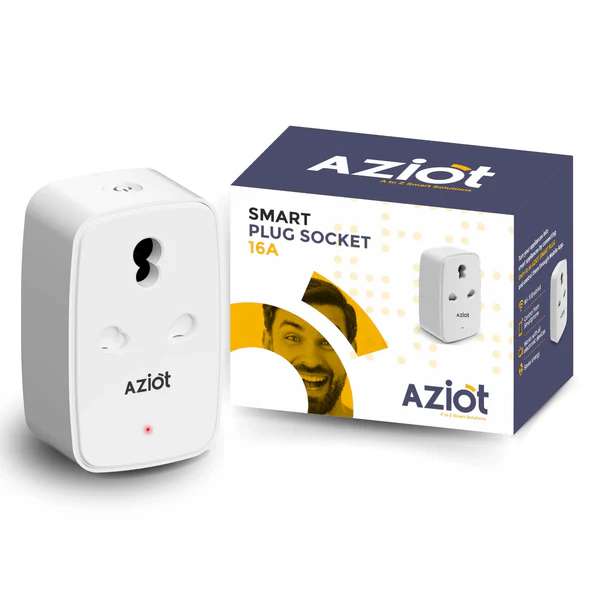
At its core, a smart timer plug is an adapter that fits between your standard electrical wall outlet and an appliance, effectively “smartening” any traditional device with an on/off switch. Think of it as a gateway, connecting your old-school coffee maker or a simple table lamp to the expansive world of your smart home ecosystem.
Why does this unassuming little gadget matter so much? Because it democratizes smart home technology. You don’t need to replace all your existing appliances to enjoy the benefits of automation. A smart timer plug breathes new life into your current devices, granting you remote control, scheduling capabilities, and even voice command functionality, all through a user-friendly app on your smartphone. It’s an affordable entry point into a more connected, responsive, and energy-efficient home.
How Smart Timer Plugs Work Their Magic: Getting Started
The operational principle behind a smart timer plug is surprisingly simple: it controls the flow of electricity to whatever is plugged into it. The real magic, however, lies in its connectivity. Most smart timer plugs connect to your home’s Wi-Fi network, typically on the 2.4GHz band, and are managed via a dedicated smartphone application.
Once connected, this app becomes your command center. You can switch devices on or off instantly, no matter where you are – whether you’re relaxing on the couch or halfway across the globe. Furthermore, many smart timer plugs integrate seamlessly with popular voice assistants like Amazon Alexa, Google Assistant, and Apple Siri, allowing for hands-free control with simple voice commands.
While many smart timer plugs are Wi-Fi-only and require no additional hub, some advanced models leverage technologies like Zigbee or Thread. These often require a central hub to function but can offer enhanced reliability, a stronger network, and potentially lighten the load on your Wi-Fi router. Choosing between these largely depends on your existing smart home setup and future expansion plans.
Setting Up Your Smart Timer Plug: A Simple Step-by-Step Guide
Getting a smart timer plug up and running is typically a straightforward process, designed for even the most tech-hesitant homeowner. Here’s a general guide to get you started:
- Unbox and Plug In: Unpack your smart timer plug and plug it into any standard electrical wall outlet.
- Download the App: Scan the QR code provided in the manual or search for the recommended companion app (e.g., Smart Life, Tuya Smart, Kasa) on your smartphone’s app store. Download and install it.
- Create an Account (if required): Follow the app’s prompts to create a new user account or log in if you already have one.
- Pair the Device: Most apps will guide you through the pairing process. This usually involves putting the smart plug into pairing mode (often by holding down its power button for a few seconds) and then confirming the device in the app. Ensure your phone is connected to your home’s 2.4GHz Wi-Fi network during this step, as many smart plugs do not support 5GHz Wi-Fi.
- Name Your Plug: Give your smart plug a recognizable name (e.g., “Living Room Lamp,” “Coffee Maker,” “Christmas Lights”) to make it easy to identify and control.
- Start Scheduling: Once paired, you can access the core “timer” features. Set custom schedules for when you want your device to turn on or off. For example, you can program your bedroom lamp to switch on at sunset and off at bedtime, or your coffee maker to brew a fresh pot just before your alarm goes off.
It’s often a breeze, taking just a few minutes, and you’re ready to experience a smarter way of living.
Beyond Basic Timers: Maximizing Your Smart Plug’s Potential
While the “timer” aspect is a key feature, modern smart timer plugs offer a rich array of functionalities that push far beyond simple scheduling.
- Remote Control Anywhere, Anytime: Imagine leaving for vacation and suddenly wondering if you turned off your curling iron. With a smart timer plug, that worry is gone. Open the app on your phone and switch it off remotely with a tap. This remote accessibility provides peace of mind and ultimate control over your home’s energy consumption.
- Voice Control for Effortless Living: Integrate your smart timer plugs with voice assistants like Alexa or Google Assistant for hands-free convenience. “Alexa, turn on the living room fan,” or “Hey Google, turn off the bedside lamp” can become part of your daily routine, adding a touch of futuristic ease to your home.
- Energy Monitoring to Slash Your Bills: Many advanced smart timer plugs come equipped with energy monitoring capabilities. This feature tracks the real-time power consumption of the connected appliance, providing valuable insights into which devices are energy hogs. By understanding your usage patterns, you can make informed decisions to optimize energy use and significantly reduce your electricity bills.
- Enhanced Security with “Away Mode”: When you’re away from home, the “Away Mode” feature can randomly turn lights on and off, simulating occupancy to deter potential intruders. This simple yet effective security measure adds an extra layer of protection to your home, making it appear lived-in even when it’s empty.
- Child Lock and Overload Protection: For families with young children, a “Child Lock” feature on some plugs prevents accidental operation, ensuring safety. Additionally, many smart timer plugs include “Overload Protection,” which automatically cuts power if a connected device draws too much current, safeguarding your appliances and preventing potential fire hazards.
“The true power of smart plugs isn’t just in automating tasks, but in empowering homeowners to take active control of their environment, saving energy and enhancing security in ways traditional switches never could,” says Dr. Anya Sharma, a leading smart home technology expert at the Global Institute of Connected Living.
The Tangible Benefits of Smart Timer Plugs: Energy Savings, Safety, and Convenience
Integrating smart timer plugs into your home offers a cascade of advantages that touch on every aspect of daily life.
Slash Your Energy Bills with Smart Scheduling
One of the most compelling reasons to embrace smart timer plugs is their profound impact on energy consumption. By scheduling devices to turn on and off only when needed, you can eliminate wasteful standby power and ensure appliances aren’t running unnecessarily. For instance, program your air conditioner or heater to switch off an hour after you leave for work and turn back on just before you arrive home, creating a comfortable environment without continuous energy drain. Smart astronomical timers can even coordinate with daily light cycles, ensuring outdoor lights are only active when it’s truly dark, adapting with the seasons.
Boost Home Safety and Security
Smart timer plugs are silent guardians for your home. Imagine the nagging doubt about whether you turned off the iron or hair straightener. With remote control, you can check and switch them off from anywhere, significantly mitigating fire risks. As mentioned, the “Away Mode” provides a crucial layer of security, creating the illusion of an occupied home when you’re away on vacation or working late.
Unmatched Convenience for Your Daily Life
The sheer convenience offered by smart timer plugs is a game-changer. Control hard-to-reach outlets with a tap on your phone. Have your coffee machine start brewing exactly when you wake up. Set up your bedroom fan to cool down the room before you even step inside. For children, smart plugs can manage screen time by automatically turning off gaming consoles or TVs after a set period, or ensuring nightlights are on at bedtime. This level of automation streamlines your routines and simplifies daily tasks, freeing up your time and mental energy.
Choosing the Right Smart Timer Plug for Your Home
With a growing market, selecting the ideal smart timer plug can feel daunting. Here are key factors to consider:
- Compatibility: Ensure the plug works with your existing smart home ecosystem (e.g., Alexa, Google Home, Apple HomeKit). Look for Matter-compatible plugs for broader, future-proof integration.
- Features: Do you need energy monitoring to track usage and save on bills? Is a compact design essential to avoid blocking adjacent outlets? Will you use it outdoors, requiring a weatherproof rating?
- Network Type: While Wi-Fi plugs are common and hub-free, consider Zigbee or Thread options if you already have a hub and want to reduce Wi-Fi network congestion or enhance reliability.
- Wattage Rating: Always check the plug’s maximum wattage and amperage to ensure it can safely handle the appliances you intend to connect.
Expert Insights: Navigating the Smart Plug Market
“The smart timer plug market is evolving rapidly, with Matter compatibility becoming a significant trend for seamless integration across various platforms,” notes Mr. Elias Vance, a senior analyst specializing in IoT devices. “Consumers should prioritize plugs that offer robust security features, reliable connectivity, and clear energy monitoring data to truly maximize their smart home experience.”
Frequently Asked Questions (FAQ)
Do smart timer plugs save electricity?
Yes, smart timer plugs can significantly help save electricity by allowing you to schedule when devices turn on and off, reducing standby power consumption, and enabling real-time energy monitoring to identify and curb wasteful habits.
Are smart timer plugs safe?
Generally, yes. Reputable smart timer plugs come with safety certifications and often include features like overload protection, which automatically shuts off power if a device draws too much current, preventing damage and potential fire hazards.
Can I use a smart timer plug outdoors?
Yes, but you must use smart plugs specifically rated for outdoor use. These plugs are designed to be weatherproof and withstand harsh environmental conditions, making them ideal for automating outdoor lighting or garden features.
Do I need a hub for a smart timer plug?
Many smart timer plugs connect directly to your home’s Wi-Fi network and do not require a separate hub. However, some advanced models (e.g., those using Zigbee or Thread) might need a compatible hub for full functionality and enhanced network performance.
What devices can I use with a smart timer plug?
You can use smart timer plugs with almost any appliance that has a physical on/off switch and doesn’t exceed the plug’s wattage rating. Common uses include lamps, fans, coffee makers, humidifiers, holiday lights, and even hair straighteners.
Embrace a Smarter, Simpler Home
Smart timer plugs represent an accessible yet powerful leap towards a truly intelligent home. They empower you to automate, control, and optimize your devices with unprecedented ease, bringing a new level of convenience, energy efficiency, and peace of mind to your daily life. By understanding their functionality and harnessing their full potential, you’re not just buying a gadget; you’re investing in a smarter, simpler, and more sustainable way of living. So go ahead, plug in, and unlock the future of your home with a smart timer plug.