Ever dreamed of a home that anticipates your needs, where your coffee starts brewing before you even step out of bed, or your lights turn off automatically when you leave? Welcome to the world of smart homes, and at its heart lies a surprisingly simple yet powerful device: the smart plug. Among the many options available, the Globe Smart Plug stands out as a straightforward, accessible solution for transforming your ordinary appliances into intelligent, connected devices. It’s your personal assistant, making everyday life a little easier, one plug at a time.
What Exactly is a Smart Plug and Why Do You Need One?
Think of a smart plug as a bridge between your traditional electronics and your modern smart home ecosystem. It’s a small, unassuming adapter that plugs into any standard wall outlet. You then plug your “dumb” device—be it a lamp, a fan, a coffee maker, or even your holiday lights—into the smart plug. Suddenly, that ordinary appliance gains an extraordinary new ability: remote control via an app on your smartphone or even through voice commands.
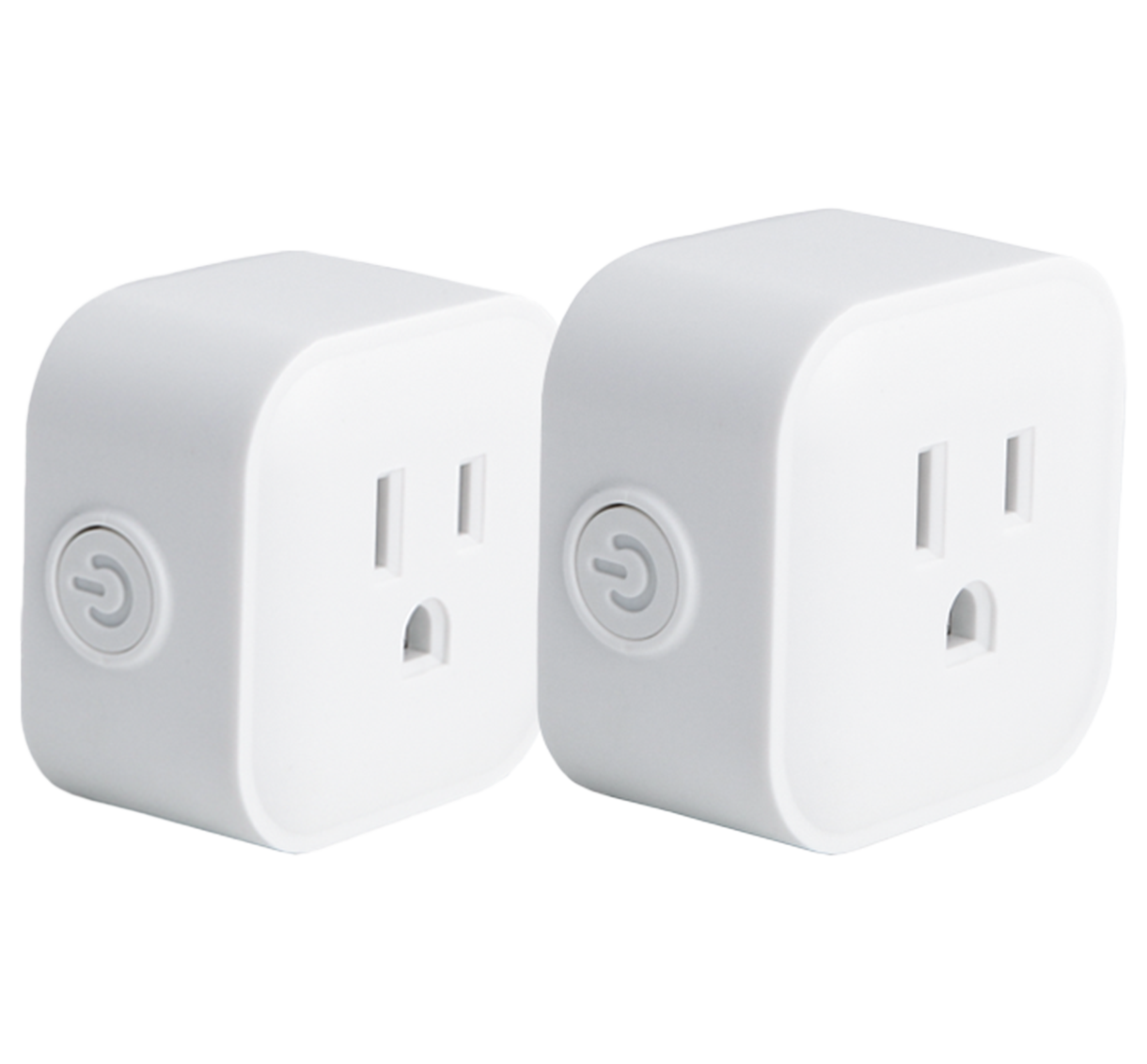
Why do you need one? The reasons are plentiful. Imagine never having to get out of bed to turn off a forgotten light, or scheduling your fan to kick on just before you arrive home on a sweltering day. Smart plugs offer unparalleled convenience, enhance home security, and can even subtly contribute to energy savings by ensuring devices aren’t left running unnecessarily. “Smart plugs are the perfect starting point for anyone looking to dip their toes into home automation,” notes Anya Sharma, a leading smart home technology analyst. “They’re affordable, easy to install, and deliver immediate, tangible benefits.”
Understanding the Globe Smart Plug: Simplicity Meets Smart Control
When we talk about the Globe smart plug, we’re referring to the Globe Electric Wi-Fi Smart Plug, a popular choice known for its user-friendly approach. Globe Electric has carved a niche by focusing on simplicity and core functionality, making smart home technology less intimidating.
One of the standout features of the Globe smart plug is its incredibly compact design. Measuring around 1.5 by 2.2 by 1.1 inches, it’s designed to be sleek and unobtrusive, ensuring it won’t block the second outlet in a standard two-outlet receptacle. This thoughtful design means you can maximize your wall space without sacrificing functionality.
Crucially, the Globe smart plug operates without needing a separate hub. Many smart home devices require a central hub to communicate, adding an extra layer of complexity and cost. Not so with Globe. These plugs connect directly to your home’s existing Wi-Fi network (specifically the 2.4 GHz band), making setup a breeze. Control is handled through the intuitive Globe Suite mobile app, available for both iOS and Android devices, putting command of your home right at your fingertips.
It’s also ready to integrate with your favorite voice assistants. Whether you prefer conversing with Amazon Alexa, Google Assistant, or Apple Siri, the Globe smart plug responds to your voice commands, adding a layer of hands-free convenience that truly elevates your smart home experience. However, it’s worth noting that while it offers robust core features, the Globe smart plug typically does not include energy usage reports, nor does it support Apple HomeKit or IFTTT platforms. This focus on essential smart capabilities keeps it simple and often more affordable.
How Globe Smart Plugs Work Their Magic and What You Need to Get Started
At its core, a Globe smart plug functions by acting as a remote-controlled switch. Inside its compact casing, a Wi-Fi module allows it to communicate with your home network, and a relay physically controls the flow of electricity to the plugged-in appliance. When you send a command from the Globe Suite app or via voice, that signal travels through your Wi-Fi, reaches the plug, and tells the relay to turn on or off. It’s a seamless dance between your digital command and real-world action.
To get started with your Globe smart plug, you’ll need just a few essentials:
- A Globe Smart Plug: Of course! These are typically available as single units or multi-packs.
- A Smartphone: An iOS (9.0 or higher) or Android (4.4 or higher) device to run the Globe Suite app.
- The Free Globe Suite App: This is your control center for all your Globe smart devices.
- A 2.4 GHz Wi-Fi Network: Most home routers broadcast on both 2.4 GHz and 5 GHz frequencies. Globe smart plugs specifically use the 2.4 GHz band for optimal range and compatibility. If your router combines these bands under one name, you might need to temporarily separate them during the initial setup for a smoother pairing process.
- An Appliance to Make Smart: Anything that plugs into a standard wall outlet can potentially become “smart” with a Globe plug.
Your Step-by-Step Guide to Installing and Using Your Globe Smart Plug
Installing your Globe smart plug is refreshingly straightforward. Here’s how to get your smart home journey off the ground:
- Download the Globe Suite App: Head to your smartphone’s app store (App Store for iOS, Google Play for Android) and search for “GLOBE SUITE.” Download and install the free application.
- Create Your Account: Open the app and follow the prompts to register. You’ll typically enter an email address or mobile number and create a password. If you already have a Globe Suite account, simply log in.
- Plug in Your Smart Plug: Insert the Globe Electric Wi-Fi Smart Plug into a standard wall outlet. The power button on the side should begin to flash blue, indicating it’s in pairing mode. If it doesn’t flash, you might need to hold the power button for about 5 seconds to initiate pairing.
- Connect to 2.4 GHz Wi-Fi: Before adding the device, ensure your smartphone is connected to your home’s 2.4 GHz Wi-Fi network. This is crucial for initial setup.
- Add Device in the App: Open the Globe Suite app, tap the “Add Device” button or the “+” symbol in the top right-hand corner. The app should automatically recognize the flashing smart plug.
- Enter Wi-Fi Credentials: Follow the on-screen instructions, confirming your Wi-Fi SSID (network name) and entering your Wi-Fi password.
- Pairing Complete: Once connected, the app will confirm the device has been added, and the plug’s indicator light will typically turn solid blue or off, depending on its status. You can now name your plug (e.g., “Living Room Lamp,” “Bedroom Fan”).
- Integrate Voice Control (Optional): If you wish to use voice commands, navigate to the “Profiles” or “Me” section in the Globe Suite app. Look for options to integrate with Amazon Alexa, Google Assistant, or Siri. Follow their respective instructions to link your Globe Suite account.
“The beauty of the Globe smart plug is its intuitive setup,” says smart home consultant Mark Jensen. “Even tech novices can have it up and running in minutes, turning everyday items into smart gadgets with minimal fuss.”
Maximizing Your Globe Smart Plug: Tips, Tricks, and Smart Ideas
The real power of your Globe smart plug comes alive when you start exploring its automation features within the Globe Suite app. It’s more than just an on/off switch; it’s a tool for crafting a smarter, more efficient daily routine.
- Scheduling: This is a cornerstone of smart plug utility. You can set precise schedules for your devices to turn on or off. Want your lamps to mimic your presence while you’re away? Schedule them to turn on at sunset and off late at night. Need your coffee maker to start five minutes before your alarm? The schedule feature makes it happen, daily, on weekdays, or just on weekends.
- Trigger Scenes: Imagine tapping a single button in your app and having multiple actions occur. That’s a Trigger Scene. For instance, a “Goodnight” scene could simultaneously turn off your bedside lamp, living room light, and bedroom fan with one tap.
- Automatic Scenes: Take automation a step further by setting conditions. An “Automatic Scene” can activate your plug based on various factors. Perhaps you want your fan to turn on if the temperature in the room exceeds a certain degree (if integrated with a smart thermometer), or your outdoor lights to come on at sunset based on local weather data.
- Vacation Mode: For peace of mind when you’re away, the vacation mode is invaluable. This feature will randomly turn your connected lights on and off at irregular intervals, making it appear as though someone is home, deterring potential intruders.
- Child Lock: If you have curious little ones who love pressing buttons, the child lock function allows you to disable the manual power button on the plug, ensuring only app or voice control can operate the device.
- Light Mode: The backlit power button is helpful, but sometimes you might prefer it off. The “Light Mode” setting allows you to control the LED indicator, turning it off if it’s too bright in a bedroom or simply for a cleaner aesthetic.
- Restart Status: In the event of a power outage, you can configure your plug to resume its last power status, stay off, or automatically turn back on once power is restored. This prevents unexpected surprises.
- Grouping Plugs: If you have multiple Globe smart plugs in one room, you can group them within the app to control them all simultaneously, synchronizing lighting or other devices for a cohesive smart home experience.
Beyond Convenience: The Real Benefits of Globe Smart Plugs
While the sheer convenience of a Globe smart plug is often the first thing people notice, its benefits extend much further, impacting your lifestyle, safety, and even your wallet.
- Indirect Energy Saving: Although Globe plugs don’t offer direct energy monitoring, they are powerful tools for behavioral energy management. By setting schedules, you eliminate “phantom load” – the electricity consumed by devices even when they’re turned off but still plugged in. Forgetting to turn off a fan or a lamp becomes a thing of the past with automated schedules, leading to noticeable reductions in your electricity bill over time.
- Enhanced Safety and Security: Automating lights with schedules or vacation mode adds a layer of security, making your home appear occupied even when you’re away. For holiday decorations, automating their power prevents overheating or fire hazards from being left on too long. Plus, controlling devices remotely means you can turn off a hair straightener you forgot to unplug, preventing potential accidents.
- Unmatched Convenience: This is the most immediate and satisfying benefit. Remote control from your phone, voice commands through your smart assistant, and custom automation truly make life easier. Imagine waking up to a brewed coffee, or walking into a well-lit home after dark, all without lifting a finger.
- Accessibility to Smart Home Tech: For many, the idea of a smart home seems complex and expensive. Globe smart plugs break down this barrier, offering an affordable and easy entry point into home automation. Their “no hub required” design lowers the initial investment and simplifies the learning curve, making smart living accessible to everyone.
Integrating with Your Smart Home Ecosystem: Advanced Features and Connectivity
The Globe smart plug is designed to be a team player, fitting seamlessly into most popular smart home ecosystems. Its compatibility with major voice assistants is a huge advantage. You can effortlessly integrate it with:
- Google Assistant: Use commands like “Hey Google, turn on the living room lamp” or “Okay Google, turn off the fan.”
- Amazon Alexa: Control your plug with phrases such as “Alexa, turn on the bedroom light” or “Alexa, set the office plug to off.”
- Apple Siri: While Globe plugs don’t support HomeKit directly, you can often use Siri Shortcuts to trigger actions.
Beyond voice control, Globe Electric products, including smart plugs, can be integrated into broader smart home systems like SmartThings, allowing for more complex automation routines involving various brands of devices.
Remember the importance of your 2.4 GHz Wi-Fi network. While modern routers often offer dual-band (2.4 GHz and 5 GHz) connections, Globe smart plugs (and many other smart devices) are optimized for the 2.4 GHz band because it offers better range and penetration through walls. If you experience connectivity issues, ensuring your phone is on the 2.4 GHz network during setup and that your plug is within a good range of your router are excellent troubleshooting steps.
As Anya Sharma, the smart home technology analyst, aptly states, “The Globe smart plug is a testament to the power of focused innovation. While it might not have every bells and whistle, its reliability and ease of integration into core smart home platforms make it a solid choice for practical home automation.” This brand’s commitment to creating a straightforward, effective user experience truly shines, enabling you to build a cohesive smart environment around its core functionality.
Final Thoughts: Embrace the Simplicity of the Globe Smart Plug
The Globe smart plug offers a compelling entry into the smart home universe. Its blend of compact design, hub-free operation, and seamless integration with popular voice assistants makes it an excellent choice for anyone looking to simplify their life and enhance their home’s intelligence. While it may not track your energy consumption or link with every single smart home platform out there, its dedication to reliable core functionality ensures you get a powerful, yet easy-to-use, smart solution.
From effortlessly managing your lights and appliances to boosting your home’s security, Globe smart plugs empower you to take control of your environment like never before. So why wait? Dive into the world of smart living, experiment with schedules and scenes, and discover just how transformative a simple Globe smart plug can be. Your future self, enjoying a perfectly automated home, will thank you!