Imagine transforming your outdoor living spaces with a simple yet powerful device that brings unparalleled convenience and control right to your fingertips. The Feit Outdoor Smart Plug is exactly that – a robust, intelligent solution designed to take your exterior lights, decorations, and appliances into the smart home era. Forget fumbling with tangled cords or braving the elements to turn things on and off; with this innovative gadget, managing your outdoor world becomes as easy as tapping your phone or speaking a command. This guide will walk you through everything you need to know about integrating the Feit outdoor smart plug into your lifestyle, making your yard, patio, and garden smarter, safer, and more energy-efficient.
What is a Smart Plug and Why Are They Important for Outdoor Spaces?
At its core, a smart plug is an adapter that connects to a standard electrical outlet, allowing you to control any device plugged into it remotely. It essentially turns a “dumb” appliance into a “smart” one. While indoor smart plugs are common, outdoor smart plugs, like the Feit outdoor smart plug, are specifically engineered for the unique challenges of exterior environments.
For outdoor spaces, smart plugs are not just a luxury; they offer practical solutions. They are vital for managing seasonal decorations, landscape lighting, water features, and even outdoor tool chargers. The ability to control these items from anywhere, set schedules, and integrate with voice assistants enhances both convenience and safety. No more trudging out in the rain to turn off holiday lights or worrying about leaving a bug zapper on overnight.
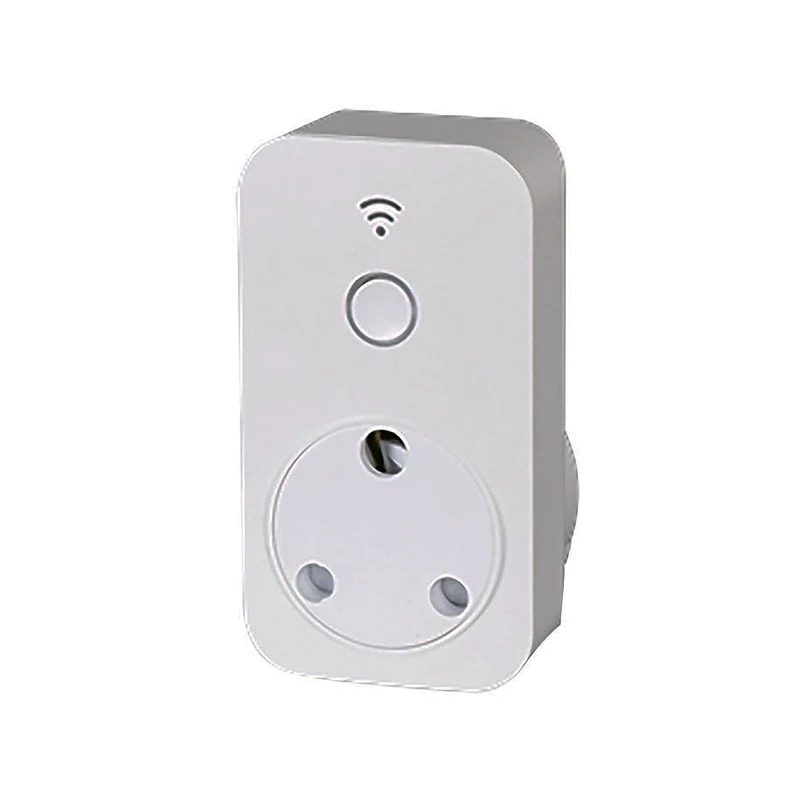
Meet the Feit Outdoor Smart Plug: Key Features at a Glance
The Feit outdoor smart plug stands out for its blend of robust design and smart functionality, tailored for the rigors of outdoor use.
Wi-Fi Connectivity for Seamless Control
Equipped with Wi-Fi connectivity, the Feit outdoor smart plug links directly to your home network, specifically supporting the widely compatible 2.4 GHz frequency. This allows you to manage connected devices from virtually anywhere using the intuitive Feit Electric app on your smartphone or tablet. Whether you’re on vacation or just in another room, your outdoor power is always within reach.
Dual or Triple Outlets, Operating in Unison
Many Feit outdoor smart plugs come with multiple outlets, typically dual or triple, offering versatility for connecting several devices. It’s important to note, however, that these outlets typically operate in unison, meaning they turn on and off together rather than individually. This design is ideal for groups of lights or sequential decorations.
Weatherproof Design for All Seasons
Built to endure the elements, the Feit outdoor smart plug is ETL and wet location rated, often described as “raintite” or water-resistant. This robust construction ensures it can withstand rain, snow, and extreme temperatures, making it a reliable choice for year-round outdoor operation. For safety, always plug it into a Ground Fault Circuit Interrupter (GFCI) outlet.
Smart Home Compatibility for Voice Control
The Feit outdoor smart plug seamlessly integrates with popular smart home ecosystems like Amazon Alexa and Google Home Assistant. This allows for convenient voice control, letting you power devices on or off with simple commands. While not directly HomeKit compatible, you can enable Siri shortcuts through the Feit Electric app’s Smart Scenes feature, offering a workaround for Apple users.
Advanced Scheduling and Timer Functions
Take advantage of the Feit Electric app to create custom schedules and timers. You can program your outdoor lights to turn on at dusk and off at dawn, or set a timer for a specific duration. This feature is a game-changer for holiday lighting, ensuring your displays are perfectly timed without manual intervention.
Remote Control and Energy Efficiency
Beyond scheduling, the ability to control your outdoor devices remotely provides peace of mind. Forgot to turn off the fountain? A quick tap on your phone solves it. This remote access also aids in energy conservation by allowing you to easily power down devices that aren’t in use, reducing unnecessary power consumption.
How Feit Outdoor Smart Plugs Work and What You Need to Get Started
The magic behind a Feit outdoor smart plug lies in its Wi-Fi capabilities. Once plugged into a standard outdoor GFCI outlet and connected to your home’s 2.4 GHz Wi-Fi network, it becomes a node in your smart home ecosystem. The Feit Electric app acts as your central command center, sending signals over Wi-Fi to the plug, telling it when to supply power and when to cut it off.
To begin your journey into smarter outdoor living, you’ll need just a few essentials:
- A stable 2.4 GHz Wi-Fi network: Ensure your network is strong enough to reach your outdoor plug. Feit smart plugs do not connect to 5 GHz networks.
- A smartphone or tablet: This will be used to download and operate the Feit Electric app.
- The Feit Electric app: Available for free on iOS and Android devices.
- An outdoor GFCI outlet: Crucial for safety when operating any electrical device outdoors.
Setting Up Your Feit Outdoor Smart Plug: A Step-by-Step Guide
Getting your Feit outdoor smart plug up and running is a straightforward process designed for simplicity.
- Download the Feit Electric App: Start by downloading the free Feit Electric app from your device’s app store and create an account.
- Plug In Your Smart Plug: For initial setup, it’s often best to plug the device into an outlet closer to your Wi-Fi router to ensure a strong connection during the pairing process. Once configured, you can move it to its desired outdoor location.
- Initiate Pairing Mode: The blue indicator light on the smart plug should be blinking rapidly. If not, press and hold the power button on the plug for approximately five seconds until it starts to blink quickly. This indicates it’s ready to connect.
- Add Device in App: Open the Feit Electric app, tap the ‘+’ icon to add a new device, and select ‘Plugs’ then ‘Outdoor Plug’. Follow the on-screen prompts, confirming your Wi-Fi network (ensure it’s 2.4 GHz) and entering your password.
- Rename Your Plug: Once connected, you can rename your plug to something easily identifiable, like “Patio Lights” or “Garden Fountain,” making it easier to control via the app or voice commands.
“The initial setup for a smart plug is critical, and Feit has streamlined this process significantly,” says Dr. Lena Sharma, a leading expert in smart home ecosystems. “Ensuring your Wi-Fi is on the correct frequency and close enough during pairing can save a lot of headaches.”
Maximizing Your Feit Outdoor Smart Plug: Tips & Tricks
Once your Feit outdoor smart plug is set up, a world of possibilities opens up. Here are some tips to get the most out of your new smart device:
- Holiday Lighting Hero: This is where the Feit outdoor smart plug truly shines. Set precise schedules for your Christmas lights, Halloween decorations, or festive displays, eliminating the need to manually plug and unplug.
- Automate Landscape Lighting: Create elegant nighttime scenes by scheduling pathway lights, uplights, or patio string lights to illuminate your yard when the sun goes down and turn off when you go to bed.
- Smart Water Features: Control your garden fountain or pond pump. You can run them during the day for enjoyment and automatically turn them off overnight to save energy.
- Charge Outdoor Tools: If you have cordless lawn mowers, trimmers, or other power tools, use the smart plug to charge their batteries during off-peak hours or ensure they’re fully charged only when you need them.
- Leverage Voice Control: Integrate your Feit outdoor smart plug with Alexa or Google Home for hands-free control. “Alexa, turn on the patio lights” makes evening ambiance effortless.
- Share Device Access: The Feit Electric app allows you to share control of your smart plug with family members or housemates, so everyone can manage the outdoor devices.
- Troubleshooting Wi-Fi Issues: If your plug goes offline, first check your Wi-Fi signal strength at the plug’s location. Moving the plug closer to your router or using a Wi-Fi extender can often resolve connectivity problems.
- Utilize Lock Mode: Some Feit plugs offer a lock mode, allowing you to manually lock the device in an on or off state by pressing the power button multiple times, preventing accidental changes via the app.
The Unrivaled Benefits of Feit Outdoor Smart Plugs: Convenience, Safety, and Savings
Adopting the Feit outdoor smart plug is more than just buying a gadget; it’s investing in a smarter, more efficient, and safer outdoor lifestyle.
Unmatched Convenience
The most apparent benefit is convenience. With remote access and scheduling capabilities, you gain effortless control over your outdoor electrical devices. You can adjust your outdoor lights or decorations from the comfort of your couch, your office, or even another country. This “set it and forget it” mentality frees up your time and reduces daily chores.
Enhanced Safety
Safety is a paramount concern for any outdoor electrical setup. Smart plugs contribute significantly by allowing you to easily power down devices that might pose a hazard, especially in unpredictable weather. Automatically turning off heat lamps or garden tools after a set time also mitigates risks. The weatherproof design ensures the device itself is safe for outdoor use, provided it’s used with a GFCI outlet.
Significant Energy Efficiency
By setting precise schedules and timers, you can ensure devices are only drawing power when absolutely necessary. This prevents unnecessary energy waste from lights left on all night or fountains running constantly. Over time, these small adjustments can lead to noticeable savings on your electricity bill, contributing to both your wallet and the environment.
Integrating Your Feit Outdoor Smart Plug into Your Smart Home Ecosystem
The true power of the Feit outdoor smart plug is unlocked when it becomes a cohesive part of your broader smart home ecosystem.
Seamless Integration with Alexa and Google Home
The Feit Electric app allows for straightforward linking with Amazon Alexa and Google Home. Once connected, you can assign your smart plug to specific rooms or groups and control it using voice commands. For instance, “Hey Google, turn on the backyard lights” can illuminate your entire outdoor space instantly. You can also incorporate your Feit plug into routines, such as having your outdoor lights come on automatically when your “Good Evening” routine activates.
Siri Shortcuts for Apple Users
While direct Apple HomeKit integration is not supported, Feit provides a clever alternative through Siri Shortcuts. Within the Feit Electric app, you can create “Smart Scenes” that trigger specific actions for your plug. These scenes can then be assigned a custom voice command that Siri can recognize, effectively bringing a layer of HomeKit-like control to your Feit devices.
Frequently Asked Questions about Feit Outdoor Smart Plugs
Here are some common questions users have about the Feit outdoor smart plug:
Do the outlets on a Feit outdoor smart plug operate independently?
No, the outlets on most Feit outdoor smart plugs are designed to operate in unison. This means all connected devices will turn on or off at the same time. This is an important consideration when planning your outdoor setup.
What Wi-Fi frequency does the Feit outdoor smart plug use?
The Feit outdoor smart plug operates exclusively on the 2.4 GHz Wi-Fi band. It is not compatible with 5 GHz networks. Ensure your router is configured to broadcast a 2.4 GHz signal for successful pairing.
Is the Feit outdoor smart plug waterproof?
The Feit outdoor smart plug is weatherproof and wet location rated, designed to withstand exposure to rain and other outdoor elements. However, it is not meant to be submerged in water. Always plug it into a GFCI outlet for optimal safety.
Can I use my Feit outdoor smart plug with Apple HomeKit?
Direct integration with Apple HomeKit is not supported. However, you can create Siri Shortcuts through the Feit Electric app’s Smart Scenes feature to control your plug using Siri voice commands.
How do I reset my Feit outdoor smart plug?
To reset your Feit outdoor smart plug, typically you will need to press and hold the reset or power button on the device for approximately 5 seconds until the indicator light begins to blink rapidly. This puts it back into pairing mode.
What should I do if my Feit outdoor smart plug goes “offline”?
If your plug goes offline, it often indicates a loss of Wi-Fi connection. Try moving the plug closer to your router, ensuring your Wi-Fi network is stable, and checking that the device is still receiving power. You may need to re-pair it if the issue persists.
Can I share control of my Feit outdoor smart plug with others?
Yes, the Feit Electric app allows you to share control of your smart devices with other users who have a Feit Electric account. This is done through the app’s ‘Share Devices’ feature.
Conclusion
The Feit outdoor smart plug is a remarkable tool that simplifies and enhances the management of your outdoor electrical devices. With its robust weatherproof design, seamless Wi-Fi connectivity, and compatibility with leading smart home platforms, it transforms mundane tasks into effortless routines. From illuminating holiday displays with precision to ensuring your garden fountain operates on schedule, the benefits of convenience, safety, and energy savings are undeniable. Embrace the future of outdoor living; explore the possibilities that a Feit outdoor smart plug brings to your home and make your exterior spaces truly intelligent. It’s time to experience outdoor control that’s smarter, simpler, and more secure.