Imagine a home where your coffee machine starts brewing before you even get out of bed, your lights dim automatically for movie night, and your holiday decorations sparkle on a perfect schedule – all effortlessly controlled with a simple tap or a voice command. This isn’t science fiction; it’s the reality an Apple Homekit Smart Plug brings to your fingertips. These unassuming devices are transforming ordinary homes into intelligent havens, seamlessly integrating with your Apple ecosystem to offer convenience, energy savings, and peace of mind like never before. If you’re looking to elevate your living space, understanding the power of an Apple HomeKit smart plug is your first step towards a truly connected home.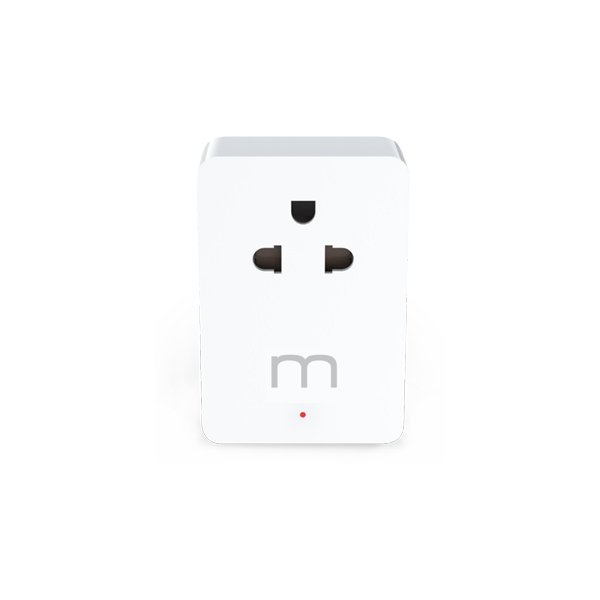
What is an Apple HomeKit Smart Plug and Why Does It Matter?
At its core, a smart plug is a compact device that you plug into a standard electrical outlet. It then provides the ability to remotely control whatever appliance is plugged into it. An Apple HomeKit smart plug takes this concept and integrates it directly into Apple’s robust HomeKit platform. This means you can manage any connected device—from lamps and fans to humidifiers and coffee makers—using your iPhone, iPad, Apple Watch, or even your voice with Siri. The beauty of HomeKit lies in its secure and user-friendly ecosystem, making these smart plugs not just simple power switches, but integral components of a cohesive smart home experience.
Powering Up Your Life: How Apple HomeKit Smart Plugs Work
The magic behind an Apple HomeKit smart plug begins with its connection to your home’s Wi-Fi network. Once plugged in, the smart plug establishes a bridge between your traditional appliance and your digital world. Through the Apple Home app on your iOS device, you can instantly turn devices on or off, set schedules, and monitor their status from anywhere.
For advanced functionalities and remote access when you’re away from home, a HomeKit hub is typically required. This could be an Apple TV, HomePod, or a dedicated iPad acting as a hub, ensuring your commands reach your smart plugs even when you’re miles away.
A significant leap forward for these devices is the growing adoption of Matter compatibility. Matter is a new universal standard that enables smart home devices from different brands to work together seamlessly. This means an Apple HomeKit smart plug with Matter support isn’t just limited to the Apple ecosystem; it can also interoperate with other platforms like Amazon Alexa and Google Home, future-proofing your smart home setup and expanding your control options.
To begin your smart plug journey, you’ll need:
- An Apple HomeKit smart plug.
- An iOS device (iPhone or iPad).
- The Apple Home app (pre-installed on iOS devices).
- A stable 2.4 GHz Wi-Fi network.
- (Optional but highly recommended) A HomeKit hub for remote access and advanced automations.
Seamless Setup: Installing and Using Your Apple HomeKit Smart Plug
Getting your Apple HomeKit smart plug up and running is surprisingly straightforward. Forget complicated wiring or technical jargon; the process is designed for everyday users.
Here’s a quick guide to getting started:
- Plug it in: Simply insert your smart plug into any standard wall outlet. Ensure the appliance you want to control is then plugged into the smart plug.
- Open the Home app: Launch the Apple Home app on your iPhone or iPad.
- Add Accessory: Tap the “+” icon in the top right corner, then select “Add Accessory.”
- Scan the code: Use your device’s camera to scan the HomeKit QR code or manually enter the 8-digit HomeKit setup code found on the plug itself or its packaging.
- Assign and name: Follow the on-screen prompts to assign the plug to a specific room (e.g., “Living Room”) and give it a descriptive name (e.g., “Living Room Lamp”).
- Start controlling: Once added, you can immediately turn the device on or off directly from the Home app.
But the real power emerges with Siri. Simply say, “Hey Siri, turn on the Living Room Lamp,” and your command is instantly executed. You can also create “Scenes” – custom settings that control multiple devices with a single command. For instance, a “Good Night” scene could turn off all your smart plugs and dim your HomeKit lights, while a “Movie Time” scene could turn on your TV (if connected to a smart plug) and adjust your smart lighting. Integrating your Apple HomeKit smart plug with other HomeKit devices, like motion sensors, can unlock even more sophisticated automations, making your home respond intuitively to your presence.
Beyond the Basics: Tips and Tricks to Maximize Your Smart Plug’s Potential
An Apple HomeKit smart plug is more than just a remote switch; it’s a versatile tool for enhancing daily life. Here are some ways to get the most out of yours:
- Energy Monitoring and Savings: Many advanced smart plugs offer energy monitoring features. This allows you to track the electricity consumption of plugged-in devices over time, helping you identify energy hogs and implement schedules to reduce standby power. “Understanding which devices are consuming power unnecessarily is the first step towards a truly energy-efficient home,” says Michael Chen, a leading smart home technology analyst. “HomeKit smart plugs with energy monitoring empower users to make informed decisions that benefit both their wallets and the environment.”
- Enhanced Home Security with Vacation Mode: Create “Away” routines that randomly turn lights and other appliances on and off, giving the illusion that someone is home even when you’re away. This simple yet effective trick can deter potential intruders, offering an extra layer of security.
- Creative Appliance Control: Think beyond lamps. Connect your slow cooker to an Apple HomeKit smart plug to start dinner on your way home, or link a fan to a temperature sensor to kick on when it gets too warm. Need a quick reboot for a finicky router? Plug it into a smart plug and power cycle it remotely without crawling behind furniture.
- Holiday Light Automation: Take the hassle out of holiday decorating. Schedule your indoor and outdoor festive lights to turn on at dusk and off at bedtime, ensuring a consistent and magical display without daily manual effort.
- Grouping for Unified Control: Group multiple smart plugs or other HomeKit devices together by room or function within the Home app. This allows you to control several devices simultaneously with one command, such as turning off all bedroom electronics when you leave for work.
The Smart Advantage: Benefits of Apple HomeKit Smart Plugs
Choosing an Apple HomeKit smart plug offers a compelling suite of advantages that significantly upgrade your home living experience.
Convenience at Your Fingertips
The most immediate benefit is unparalleled convenience. With remote control via the Home app, you’re always connected to your home. Forgot to turn off the curling iron? Need to start charging your phone before you get home? A quick tap on your iPhone or Apple Watch takes care of it, granting you peace of mind from anywhere with an internet connection.
Energy Efficiency & Cost Savings
By allowing you to precisely control when devices are on and off, smart plugs help curb unnecessary energy consumption. Eliminating “vampire drain” from electronics in standby mode and scheduling high-consumption devices to operate only when needed can lead to noticeable reductions in your electricity bill. This makes an Apple HomeKit smart plug a smart investment for both your budget and the planet.
Enhanced Home Security
Beyond convenience, these plugs contribute to your home’s safety. By scheduling lights and other devices to turn on and off at varying times, you can simulate occupancy when you’re away, effectively deterring potential intruders. This subtle yet powerful security measure makes your home appear lived-in, even when it’s not.
Voice Control Mastery with Siri
For a truly hands-free experience, Siri integration is a game-changer. Simply use natural voice commands like, “Hey Siri, turn off the bedroom fan,” or “Hey Siri, activate my ‘Good Morning’ scene,” and your smart home responds instantly. This seamless voice control adds a layer of sophistication and ease to your daily routines.
Future-Proofing with Matter
With increasing Matter compatibility, an Apple HomeKit smart plug offers greater flexibility and longevity. Matter ensures that your smart plug will communicate effectively with a wider range of smart home products and platforms, providing an adaptable foundation for your evolving smart home ecosystem. This means your investment is more secure, regardless of future shifts in smart home technology standards.
Integrating Smart Plugs into the Apple Smart Home Ecosystem
The real strength of an Apple HomeKit smart plug shines when it’s integrated into the broader Apple smart home ecosystem. The Home app acts as your central command center, offering a unified interface for all your HomeKit-compatible devices.
Through the Home app, you can create advanced automations that go beyond simple on/off schedules. For example, an automation could be set to turn on your entryway lamp (connected to a smart plug) when your HomeKit motion sensor detects movement after sunset. You can also craft intricate scenes, like a “Work From Home” scene that turns on your desk lamp, adjusts your HomeKit thermostat to a comfortable temperature, and starts your smart speaker, all with a single command.
The presence of a HomeKit hub (such as an Apple TV, HomePod, or a dedicated iPad) is crucial for unlocking the full potential of your smart home. This hub allows you to control your Apple HomeKit smart plug remotely from outside your home network, enables time-based and sensor-triggered automations to run independently, and provides a stable, always-on connection for your devices. This robust integration ensures that your smart home is not just a collection of gadgets, but a truly intelligent and responsive living environment.
Expert Insight: The Future of Smart Plugs in HomeKit
“The evolution of the Apple HomeKit smart plug is a testament to the industry’s commitment to user-centric smart home experiences,” observes Dr. Anya Sharma, Director of Smart Home Innovation at Global Tech Solutions. “With the advent of Matter, these plugs are becoming even more versatile, bridging ecosystems and offering consumers unprecedented choice and interoperability. Apple’s focus on privacy and seamless integration ensures that HomeKit smart plugs will remain a cornerstone for those building intelligent, secure, and user-friendly smart homes.” This forward-looking perspective highlights the strategic importance of HomeKit smart plugs in shaping the smart home landscape.
Frequently Asked Questions (FAQ)
What is an Apple HomeKit smart plug?
An Apple HomeKit smart plug is a device that plugs into a standard electrical outlet, allowing you to control any connected appliance remotely through the Apple Home app, Siri voice commands, or automated schedules within the Apple HomeKit ecosystem.
Do HomeKit smart plugs save energy?
Yes, HomeKit smart plugs can help save energy by enabling you to turn off devices that would otherwise consume “phantom” power in standby mode. Many also offer energy monitoring features and allow you to set schedules for optimal usage, reducing overall electricity consumption.
How do I set up a HomeKit smart plug?
Setting up a HomeKit smart plug involves plugging it into an outlet, opening the Apple Home app, tapping “Add Accessory,” and scanning the HomeKit QR code on the device. You’ll then assign it to a room and give it a name.
Can I use a HomeKit smart plug with other smart home platforms?
While primarily designed for Apple HomeKit, many newer smart plugs are incorporating Matter compatibility. This allows them to also work with other major smart home platforms like Amazon Alexa, Google Home, and Samsung SmartThings, offering greater flexibility.
What devices can I control with an Apple HomeKit smart plug?
You can control almost any appliance that plugs into a standard wall outlet and has a simple on/off switch. Common uses include lamps, fans, coffee makers, humidifiers, holiday lights, and small kitchen appliances. Avoid high-power devices like space heaters or large appliances that require consistent, uninterrupted power.
What’s the difference between a smart plug and a smart outlet?
A smart plug is a portable adapter that plugs into an existing wall outlet, making the connected device “smart.” A smart outlet, on the other hand, replaces your existing wall outlet entirely and requires electrical installation, offering a more integrated and permanent solution.
Is Apple HomeKit safe and private?
Apple places a strong emphasis on security and privacy within its HomeKit ecosystem. Data for HomeKit accessories is end-to-end encrypted between your Apple devices and your home hub, ensuring your information remains private and secure.
Conclusion: Embrace the Smart Plug Revolution
The journey to a smarter home is often paved with simple yet powerful innovations, and the Apple HomeKit smart plug stands out as a prime example. By transforming your everyday appliances into intelligent, controllable devices, these plugs unlock a world of convenience, energy efficiency, and enhanced security, all within the intuitive and secure Apple ecosystem. Whether you’re taking your first steps into smart home automation or looking to expand your existing setup, embracing the power of an Apple HomeKit smart plug is an intelligent choice. Dive in, experiment, and discover how these small devices can make a monumental difference in creating the connected home of your dreams.